
Hometown Gate
HomeTown Ticketing, Inc.Events
4.215.00 Reviews
- Version
- 4.11.0
- Installs
- 10.00K
- Age Rating
- Everyone
Screenshots
Our Review of Hometown Gate
 Analysis by Appyee
Running a school game, community performance, or local tournament often involves more than selling admission. Someone has to issue tickets, answer questions at the entrance, and confirm that each visitor has a valid pass without slowing down the line. Hometown Gate is built for that practical part of event work. In my experience, it makes the most sense as a focused companion for organizations already using a Hometown box office, rather than as a general-purpose ticket marketplace for casual event hosts.
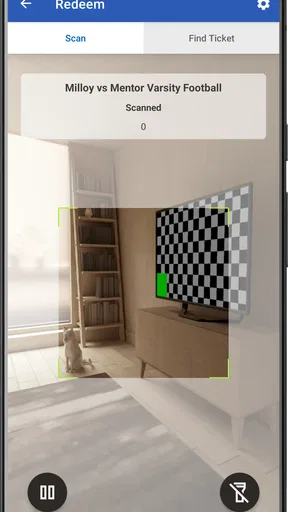
The app comes from HomeTown Ticketing, Inc. and sits in the Events category. Its purpose is straightforward: help staff sell and scan tickets connected to a Hometown box office. That narrow focus is also its main strength. Instead of trying to become a full event-planning suite, it concentrates on the moments when an organizer needs to move people through a door and keep admission records under control.
I would recommend it to a school office, athletic department, arts group, or local organizer that already relies on the Hometown ticketing system and wants a mobile tool for event-day work. I would be more cautious about recommending it to someone who only needs a simple way to collect money at a small private gathering. The app is free, has an Everyone age rating, and runs on Android from version 8.0 onward, but those points do not change the central question: does your event already belong inside the Hometown workflow?
How Hometown Gate works in a real event workflow
I’d use this section to trace a practical event-day sequence: getting the right event ready, separating routine scans from walk-up sales, and giving volunteers a clear route for unusual cases. In my view, that preparation is what turns a focused gate app into a calmer entrance workflow. It also sets up the next point: deciding whether the app’s narrow role is an advantage for your organization or a reason to consider another kind of tool.
It is most useful at the entrance, not during event planning
The clearest way to understand this app is to picture a busy school gym on a Friday evening. A staff member has a phone at the entrance, visitors arrive with tickets, and the organizer needs a quick answer to a simple question: can this person come in? Hometown Gate is designed around that exchange. It gives the person working the door a dedicated place to handle ticket sales and scanning instead of forcing them to juggle email, a browser, paper lists, and a separate payment routine.
That focus can make the experience calmer for volunteers. A person who is not involved in planning the event does not need to understand every detail of the box office. They need to open the event, find the relevant ticket activity, and process the next visitor consistently. A purpose-built gate tool is easier to hand over than a broad administrative dashboard filled with options that do not matter at the door.
There is also a useful separation of responsibilities here. The organizer can prepare the event through the Hometown box office, while entrance staff use the mobile application for the live admission task. That division matters when several people are helping. It reduces the temptation to edit event details while a queue is forming and keeps the person at the entrance focused on checking tickets.
Scanning is valuable when the queue is the real problem
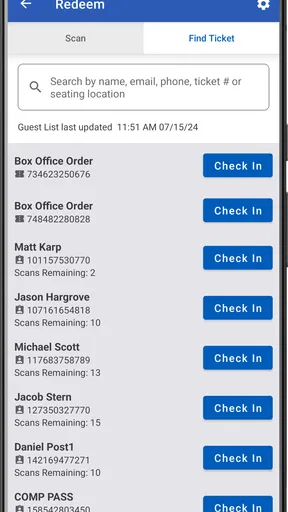
For a sold-out or popular event, the benefit is not merely replacing paper. The benefit is speed and consistency. A manual list can work when only a few guests arrive, but it becomes awkward when names are hard to read, several people share a surname, or a visitor cannot remember which email contains the ticket. Scanning gives staff a more direct way to validate admission.
In my view, the best use case is an event with a predictable rush: the opening minutes of a game, a performance with assigned start time, or a tournament session where many families arrive together. Staff can position one person to scan and another to help visitors who have trouble finding their tickets. That small division of labor is more effective than asking one volunteer to troubleshoot every issue while also controlling the line.
A second practical use is accountability after the doors open. A digital ticket check creates a cleaner admission process than relying on memory or marking names by hand. If a visitor returns to the entrance, staff have a clearer process to follow than simply asking whether the person has already entered. I would still train workers to pause when a scan does not work rather than repeatedly trying random actions, because a fast tool only helps when the team uses it consistently.
On-site sales can help when plans change
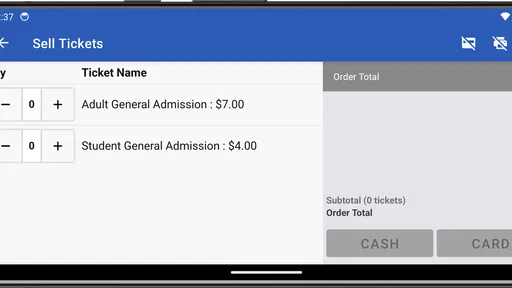
Not every guest buys ahead of time. Families decide to attend after seeing a schedule change, a student brings an extra relative, or someone arrives without having completed the online purchase. The ability to sell tickets through the same gate-oriented tool is important in those situations. It means the entrance does not necessarily have to send visitors away to find another purchasing method.
This is where I see a subtle operational advantage: one staff member can deal with last-minute buyers while another continues scanning people who already have tickets. That keeps two different tasks from becoming one long bottleneck. For a school event staffed by volunteers, clear roles are often more important than advanced features, and the app supports that kind of simple arrangement.
There is a trade-off, though. Selling at the door requires more attention than scanning. Staff need to select the correct event and ticket option, confirm the purchase, and make sure the customer receives what they expect. I would not place an inexperienced volunteer alone at a crowded entrance without a short practice session. The application may simplify the workflow, but it cannot remove the need for someone to understand the event’s admission rules.
Small preparation choices make a noticeable difference
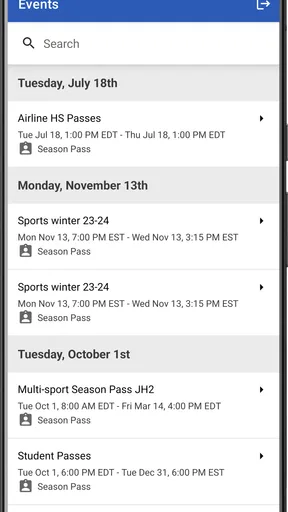
One of the most useful habits is to prepare the phone before the first visitor arrives. I would open the app, locate the event, confirm that the correct ticket activity is visible, and perform a test scan with the team. This is not glamorous preparation, but it prevents the common mistake of learning the interface while a line is waiting.
I would also assign one person to be the point of contact for unusual cases. A duplicate-looking ticket, a visitor with a damaged screen, or a customer who bought the wrong event should not force every entrance worker to improvise. The scanner can handle routine admissions; a named supervisor can handle exceptions. That arrangement protects the speed of the normal queue.
For larger events, I would place the phone where the screen can be seen without making the visitor hand over their device. That makes the interaction feel more transparent and lets the guest adjust brightness or reposition a ticket when needed. It is a small detail, but entrance friction often comes from unclear handoffs rather than from the scan itself.
The app’s public track record is encouraging but still limited
Hometown Gate has a 4.2 average from around fifty-six ratings, with roughly fifteen written reviews and more than ten thousand installs. Those figures suggest that the app has found a real audience, while also reminding me not to treat it as a universally tested solution. It is established enough to be considered seriously by Hometown users, but the relatively modest review volume means an organizer should judge it alongside a practical rehearsal at their own venue.
The current version is 4.9.0, and the application has been available since January 2020. That history is useful because it indicates this is not a brand-new experiment. Still, event software is judged under pressure: a tool that feels fine while standing in an empty office must also be comfortable when volunteers are distracted, visitors are impatient, and the phone is being used repeatedly.
The meaningful limitation is its dependence on the Hometown ecosystem
The biggest weakness is not a confusing button or an unnecessary screen. It is the app’s narrow relationship with the Hometown box office. If your organization does not already use that system, Hometown Gate is unlikely to be the first tool I would investigate. Its value comes from being connected to an existing ticketing process, so choosing it without that foundation may create more work rather than less.
This also affects comparison with alternatives. A general event platform may offer broader registration, attendee messaging, scheduling, or flexible payment options. A simple spreadsheet and printed guest list may be sufficient for a free community meeting. A venue’s own ticketing system may be better if all admissions already pass through that service. Hometown Gate is strongest when the question is specifically how to sell and validate Hometown tickets at the entrance.
There is another limitation in the human workflow. The app can help staff follow a process, but it cannot decide how your organization should handle refunds, transfers, late arrivals, complimentary admission, or a disputed purchase. Those policies need to be agreed before the event. Without that preparation, volunteers may still need to call an organizer for every exception, and the line can slow down even if routine scanning is quick.
I also would not confuse a mobile gate tool with a complete box-office replacement. Event creation, ticket design, promotion, and broader administration belong to the surrounding ticketing operation. If you want one application to manage every part of an event from first announcement to post-event communication, this focused approach may feel incomplete. Its restraint is useful for the entrance, but it is not the same as comprehensive event management.
Who should use it, and who should look elsewhere?
Hometown Gate is a strong fit for schools and community organizations that regularly sell admission through Hometown and need volunteers to work from phones. It is especially suitable when events have a concentrated arrival period, when advance tickets and door sales need to coexist, or when organizers want a more orderly alternative to checking names manually.
It can also suit a small arts group that has a rotating team at the door. The application gives those workers a defined job instead of asking them to operate the entire ticketing system. A coordinator can provide a short checklist: select the correct event, scan advance tickets, route exceptions to the supervisor, and use the sales workflow for people arriving without admission.
I would suggest caution for an organizer who runs only occasional informal gatherings. If attendance is low and the guest list is simple, setting up a dedicated box-office workflow may be more effort than the event deserves. The free price removes one barrier, but it does not remove setup time, staff training, or the need to coordinate the app with the organization’s ticketing process.
It is also not my first choice for someone comparing ticketing systems from scratch. In that situation, I would first decide whether the broader Hometown platform matches the organization’s needs, then treat this app as the entrance component. Choosing the gate application alone would be like choosing a barcode reader before deciding where the tickets will come from.
What I would check before relying on it
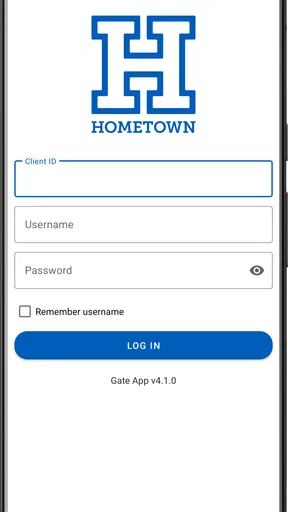
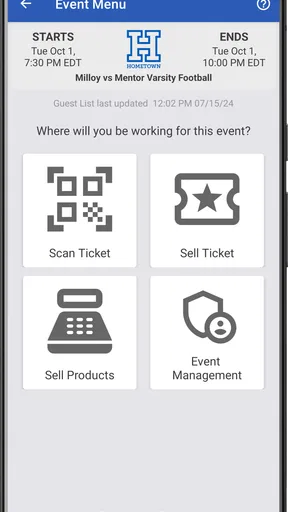
Before an important event, I would verify that the phone meets the Android requirement, that the responsible staff member can sign in and reach the correct event, and that the team understands the difference between scanning an existing ticket and selling a new one. I would rehearse both paths, because a volunteer who only practices scanning may freeze when a walk-up customer needs to buy admission.
I would also create a short exception plan. Decide who handles a failed scan, who answers questions about ticket type, and who can approve a special case. Keep that person close to the entrance instead of making staff search through messages. This is one of the less obvious ways to get more from a focused app: let the software handle repeatable checks and let people handle judgment calls.
For a multi-door event, I would test the staffing arrangement rather than assuming that more phones automatically mean faster entry. One entrance may need a dedicated seller, another may need only scanners, and a third may be reserved for guests requiring assistance. The right setup depends on the crowd, but the app’s focused purpose makes those roles easier to define than an all-in-one event dashboard would.
Finally, I would avoid making the application the only part of the contingency plan. Keep the event coordinator reachable, know how to identify the correct event, and prepare a calm manual procedure for a visitor whose phone cannot display a ticket. That is not a criticism unique to this product; it is sensible planning for any digital admission system. The important point is that Hometown Gate works best when it is part of a prepared process rather than treated as a magic fix.
My final view after weighing the trade-offs
My overall impression is that Hometown Gate succeeds by staying close to a real operational need. It is not trying to entertain the customer, replace every event tool, or overwhelm the entrance worker with administration. For organizations already using Hometown, the combination of mobile ticket sales and ticket scanning can make event admission more organized, particularly when a crowd arrives at once.
The limitation is equally clear: its usefulness depends on belonging to the Hometown ticketing workflow. People looking for a universal ticketing app, a full event-management platform, or a lightweight guest list for a private gathering may be happier with another option. Even Hometown users should prepare their staff and policies before opening the doors.
With that qualification, I think the app is worth trying for schools, local sports programs, performances, and similar events that need dependable entrance handling. Its free availability and Everyone rating make it easy to evaluate, while its Android 8.0 support covers older compatible devices. My recommendation is specific rather than broad: choose it when your Hometown box office is already the center of ticket sales and your main challenge is moving people through the gate smoothly.
Privacy and Permissions
See what permissions an app requests and how it handles your data.
- Location
- approximate location (network-based), precise location (GPS and network-based)
- Photos/Media/Files
- read the contents of your USB storage, modify or delete the contents of your USB storage
- Storage
- read the contents of your USB storage, modify or delete the contents of your USB storage
- Camera
- take pictures and videos
- Wi-Fi connection information
- view Wi-Fi connections
- Other
- view network connections, pair with Bluetooth devices, access Bluetooth settings, change network connectivity, connect and disconnect from Wi-Fi, full network access, control vibration, prevent device from sleeping
Verdict
Strengths of Hometown Gate
- Simple interface makes neighborhood information easy to browse.
- Useful for discovering nearby events, services, and local updates.
- Helps residents stay connected with their local community.
- Location-based content can make information more relevant.
- Convenient access to community resources from a mobile device.
Limitations of Hometown Gate
- Content quality may vary depending on local participation.
- Some areas may have limited listings or outdated information.
- Location permissions may be required for the best experience.
- Notifications could become excessive if many updates are enabled.
- The app may be less useful outside supported communities.
Other Releases by HomeTown Ticketing, Inc.
View All
Hometown Fan
Events4.6
Similar Picks in This Category
View All
Easy Quran Mp3 Audio Offline
Muslim Worldapp4.7

Invitation Maker: Cards & RSVP
Greetings Island4.9

StubHub - Live Event Tickets
StubHub4.3

Fever: Events & Tickets
Fever Labs4.7

Epic Freebie Games Radar
Arioch Pds - Apps & Games4.4

Invitation card Maker, Design
Splendid App Maker4.9
Frequently Asked Questions
What is Hometown Gate and what can I do with it?
Hometown Gate is a community-focused app designed to help users stay connected with local information, events, services, and updates in their hometown. Depending on the available features in your area, you may be able to browse announcements, discover nearby activities, access useful contacts, and follow local news. The exact content can vary by location, so the experience may be richer in some communities than others.
Is Hometown Gate free to download and use?
Hometown Gate can generally be downloaded at no cost, although certain features or services may depend on the policies of the organization operating the app. Before using it, check the app’s listing for information about optional purchases, subscriptions, or fees connected with specific services. Downloading the application does not necessarily guarantee access to every local feature, since availability may depend on your hometown or participating provider.
Does Hometown Gate require my location or personal information?
The app may request information such as your location, email address, or hometown so it can provide relevant local content and personalize notifications. You should review each permission carefully during setup and allow only what you consider necessary. Location access may be useful for finding nearby information, but some parts of the app could still work if you enter your community manually or disable optional permissions.
Can I use Hometown Gate without creating an account?
Whether an account is required depends on the features you want to use. Public announcements, general local information, or event listings may sometimes be available without registration, while personalized alerts, saved content, submissions, or communication tools could require an account. If registration is requested, review the information being collected and use a strong, unique password to protect your profile.
Is Hometown Gate available for every town and on both Android and iOS?
Availability may differ by region because Hometown Gate depends on participating communities, local organizations, or supported services. Your town may not appear in the app even if the application is available in your country. It is also important to check the official Google Play Store or Apple App Store listing for device compatibility, operating-system requirements, and the latest supported version before downloading.
